Free & open source GPL-3.0-or-later · for any Debian, Ubuntu or Proxmox machine
Your disks, protected. Your server, explained.
DiskFlux is a web UI and daemon for SnapRAID and mergerfs. Home tells you in one sentence whether your files are safe. Guided steps take you from the first disk of a home server to a large NAS.
Any sizemix old and new disks and brands, and add them over time
Many arrayspools and loose disks, all in one light daemon
1,200+end-to-end checks against emulated disks
Made for people, not only for admins
Know your files are safe in one look
Everyday pages come first, in plain words. The detailed controls are still there behind an Advanced switch, so beginners aren't lost and experts aren't held back.
Home
One headline. One thing to do.
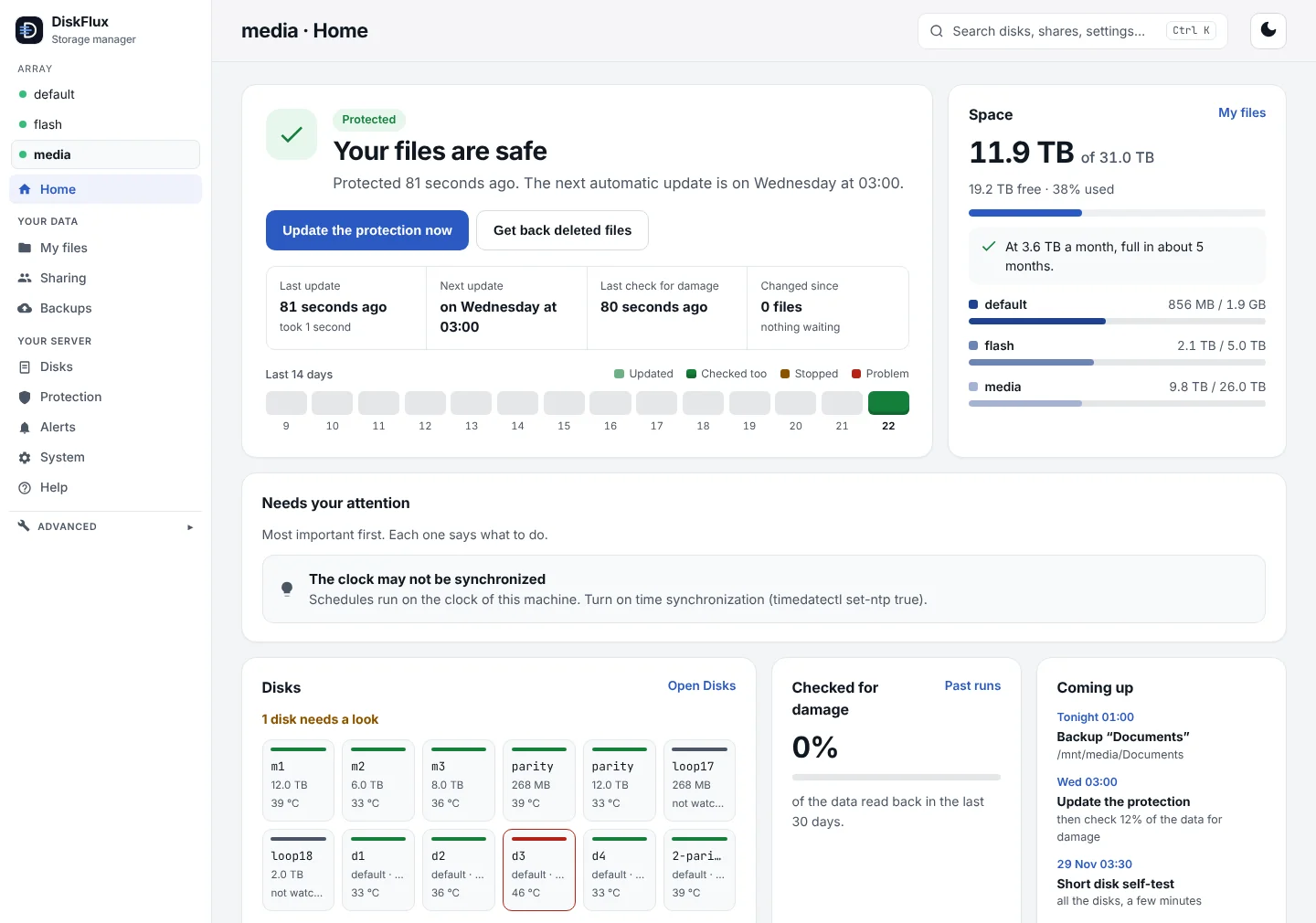
The top of Home says whether your files are safe. When they aren't, it shows the one action that fixes it. Below that you get the last 14 days of runs, space with a "full in about…" forecast, what comes next, and what just happened.
Status always in words, never colour alone
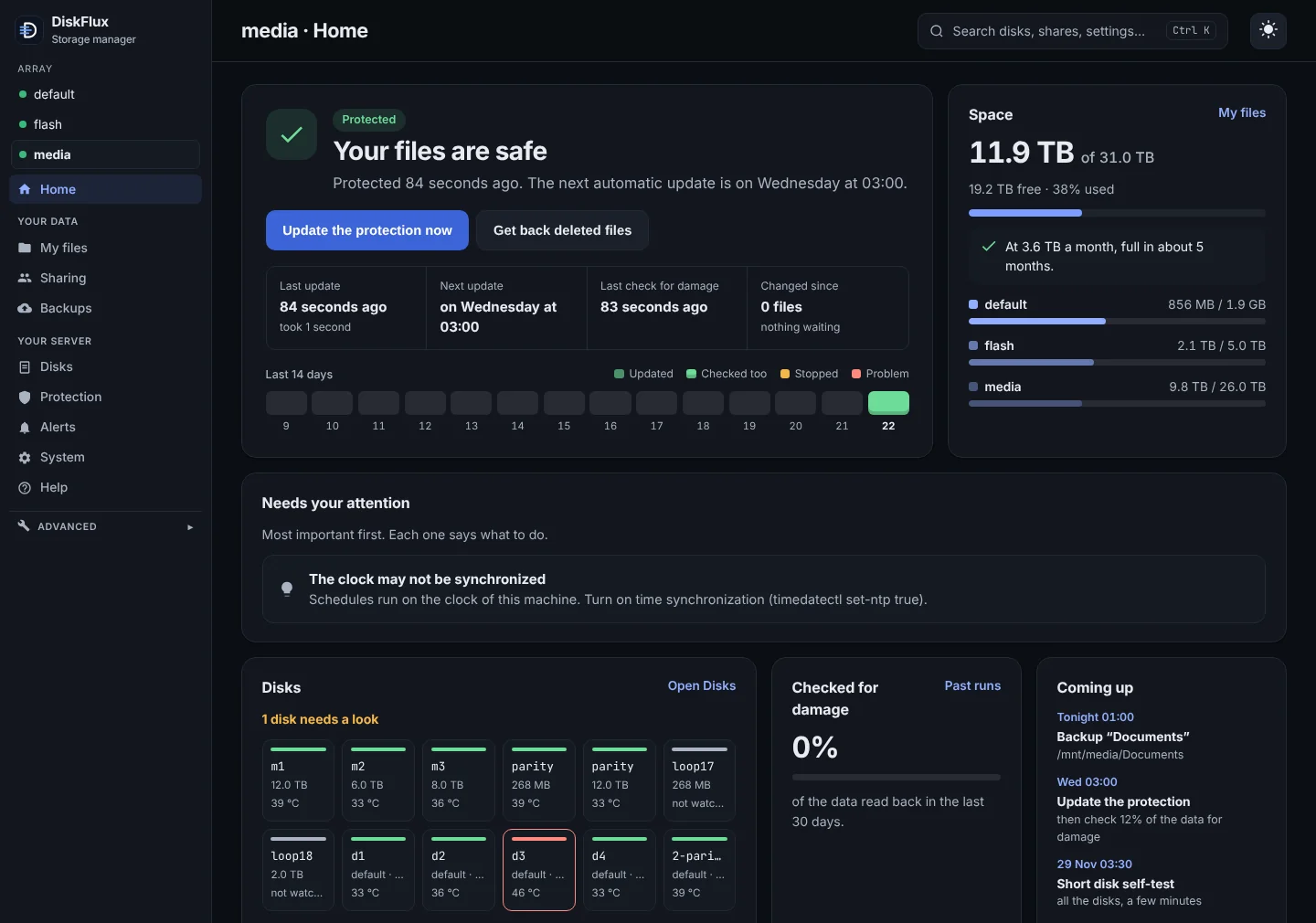
Light or dark follows your computer
Find any page, disk, share or setting with CtrlK
Disks
A picture of your case, bay by bay
Every disk sits in its bay with health, temperature and the risk of failing. Click one to see its facts and what you can do with it. A failing disk blinks in its bay, so you pull the right one.
SMART health, scheduled self-tests, temperature of the day
HDD, SMR, SAS, SATA SSD, NVMe and USB disks
Write test of a new disk before it holds a single file
Protection
The rules in plain words
"Update every night at 02:00, then check 8% of the data for damage." Every save is read back from the daemon and confirmed in words. You can see how long ago each part of your data was last checked, and every past run.
Scheduled update (sync) and damage check (scrub)
A safety stop when many files vanish at once, waiting for your OK
Every run kept: files added, changed, deleted, errors repaired
How SnapRAID protects you
Normal disks. Smart parity.
SnapRAID keeps a mathematical backup of your disks, called parity. This project puts a calm, guided face on it.
Your disks stay ordinary disks
Each one has its own filesystem and files. Any computer can read it, even without SnapRAID. Only the disk you read from spins up.
Parity is updated on a schedule
Every night (or when enough has changed) the daemon updates the parity, then checks a slice of your data for silent damage (bit rot).
A disk dies? Rebuild it.
Put in a new disk and the guided recovery rebuilds its files from parity. If more disks fail than you have parity for, you only lose what was on the failed disks.
Good to know: parity is a snapshot, not real time. Files you changed after the last update aren't protected until the next one. That's why it suits media, photos and archives that don't change often. Keep a separate copy of anything you can't replace.
your files, on normal disksparity, the mathematical backuprebuilt files
Arrays, pools and loose disks
From one array to a rack of them
One daemon runs several SnapRAID arrays, each with its own parity, schedule and alerts. mergerfs pools show many disks as one folder. Disks outside any array are still watched, and clearly marked as not protected.
An array per purpose: media, photos, a flash-only array
Arrays that share no disk can run at the same time
Move a disk with its files from one array to another, step by step
Up to SnapRAID's own limits, and fix and sync still work when an array is degraded
Arrays parity protects
media
d1d2d3parity2-parity
photos
p1p2parity
Pools one folder
/mnt/storage
d1d2d3
/mnt/photos
p1p2
A pool never contains a parity disk.
Loose disks no parity
/mnt/apps
nvme
/media/usb
backup
Shown with their space and marked "not protected".
Everything in one place
All a home server needs. Nothing it doesn't.
A storage manager for any Linux machine, not another operating system. Your apps, containers and VMs stay wherever you already run them.
Easy disk setup
A guided three-step setup: pick the disks, choose options, and review everything before a single byte is erased.
Uses mounted filesystems, or formats blank disks if you ask
Add, replace or remove a disk
Bigger parity disk? Move the parity over, safely
SnapRAID config as a form, or as text
Pools & your files
mergerfs pools are optional. Use them and every disk shows up as one folder, while each file stays a plain file on one disk.
Placement policy, balance, duplicates
Browse, copy, rename, delete
Keep a folder on chosen disks
Size of a folder, disk by disk
Recovery, guided
When something goes wrong, the page tells you what happened, what is safe, and the next step.
Get back deleted files, file by file
Check a folder for damage, repair only real damage
Rebuild a failed disk, or copy from it if it still reads
Fix and sync on a degraded array
Sharing & backups
Share folders with Windows, Mac and Linux, and keep copies on a USB disk or pull them from other computers.
Samba and NFS shares, users, recycle bin
rsync backups on a schedule or when a disk is plugged in
Back up folders of a PC, Mac or NAS
Open and Eject for USB disks
Power & hardware
A quiet, cool, frugal server that shuts down cleanly when the power goes out.
Disk spin-down, APM and write cache
UPS via NUT or apcupsd, with clean shutdown
Suspend when idle, Wake-on-LAN
Folder cache so browsing doesn't wake disks
Fast disk in front
Put an SSD in front of the pool. New files land there first and a mover takes them to the protected disks.
Mover on a schedule, by fill level, or on request
Says how much is waiting, and that it isn't protected yet
Then the arrays that got the files update their parity
Alerts that reach you
When a disk runs hot, a check finds damage or a sync waits for your OK, you hear about it.
Phone (ntfy), email, logs, your own command
Many places at once
Events of the machine and every past run, kept on disk
Upgrades in one click
Move to the latest release or pick a specific one, from the System page or one command. Your settings stay as they are.
Checksums verified before installing
Settings backup and restore
Diagnostics file with private details removed
Three looks, one engine
Quiet is the default. Commander and Brutale are there too, with the same pages.
Advanced switch on every page, remembered
A five-step tour on the first visit
Built-in help and glossary
REST API and Prometheus metrics
Designed for trust
You should never have to guess
Storage is where a wrong click hurts most. Every page follows the same few rules, so you always know where to look and can trust that a setting does what it says.
01
Say what happens, and what doesn't
Every confirmation lists the steps, and what stays untouched. Destructive steps ask you to type the disk's name.
Your files stay on the disk. Only the parity is updated.
02
Read it back, say it in words
A save isn't done until the daemon confirms it. The result is said in a sentence, not just a green tick.
Saved and checked: every day at 02:00. Next: tonight at 02:00.
03
Translate the engine
SnapRAID's messages become plain language, and jargon is explained when you hover over it.
The update waits for your OK: many files were deleted.
04
One main action per page
Each section opens with one sentence about what it's for. The most likely next step is the obvious button.
05
Good defaults, finer control on request
A choice goes on the everyday page only if most people have to make it. Everything else gets a sensible default and lives under Advanced.
06
A light daemon
Written in C. The UI is served by the daemon itself and reads from a short shared cache, so visitors don't slow your disks. Sleeping disks stay asleep.
Guided flows
The hard moments, made simple
Every screenshot was taken in the emulated-disk lab described below.
From blank disks to a protected pool
Choose each disk and its role (every disk comes with its model and serial), then the filesystem, mount points and pool. The last step lists everything that will be done, in order, before anything is erased.
Works with or without mergerfs
Takes over disks that already hold files
Swap a disk without fear
The dialog shows the steps, warns if the new disk is larger than the parity, and asks you to type a confirmation. If the old disk still reads, its files can be copied straight across instead of rebuilt.
Degraded? Maintenance pauses, recovery is offered
When a disk comes back empty, scheduled maintenance stops so the parity isn't overwritten, and the advisor offers recovery. Pick the lost disks and fix, check and sync run as one task, each step with its result.
Oops, I deleted that
See what can still be rebuilt since the last update, and choose it file by file. Afterwards the differences are checked again so you know it worked.
Outgrown your parity disk
The parity is copied to the larger disk and compared byte by byte. Only then is the array switched over. The old file is never touched. The old parity disk can then join the array as a data disk.
The lights go out
On battery, a running sync or scrub pauses and picks up again later. When the charge or remaining time gets too low, the server shuts down cleanly. A UPS that stops answering isn't mistaken for a power cut.
Trust a new disk before you fill it
A pattern is written to every block and read back, then the disk is left blank. Disks in an array or in use are refused, and you type the device name to confirm.
More from the UI
Already running SnapRAID by hand?
Add it to your setup without breaking it
Made for people who've kept an array going for years with their own config, fstab and cron job, and tested on exactly that kind of machine.
The installer leaves these alone
Your array, parity and content files
/etc/snapraid.conf and /etc/fstab
Your mergerfs pools and scheduled jobs
Anything it does change is backed up first as *.snapraidd.bak
And it plays nicely with your habits
On an array already in use, the daemon starts with no schedule and no spin-down. It watches, and only runs a sync or scrub when you ask.
Content file from SnapRAID 13 or older? The installer converts it with SnapRAID 14 without touching the parity, or stops with nothing changed if you have changes not yet synced.
Run snapraid from the shell whenever you like. SnapRAID's own lock keeps the two from colliding.
Your hand-written config keeps its comments and unknown options when saved from the UI.
Install
One command. Then open your browser.
The installer adds the SnapRAID engine from its author's releases if it's missing or older than 15.0, then the daemon, mergerfs and the tools it needs. At the end it prints the web address and the password.
Debian, Ubuntu, Proxmox and other apt systems, on x86-64
The web UI listens on port 7627, at http://your-server:7627
Package snapraid-daemon-storage, its own releases, versioned like 2.2.s10 (upstream version + fork release)
Replaces the original snapraid-daemon package. The two can't be installed together.
$ curl -fsSL https://raw.githubusercontent.com/paleka/diskflux/storage/installer.sh | sudo sh
On a new machine this also sets up Samba and NFS so you can share folders right away. On a machine that already runs SnapRAID it changes nothing in your array: see the section above.
$ curl -fsSL https://raw.githubusercontent.com/paleka/diskflux/storage/installer.sh | sudo SNAPRAIDD_AUTO=1 sh
SNAPRAIDD_AUTO=1Start with the daemon defaults: nightly sync and scrub at 02:00, idle disks spun down after 15 minutes.SNAPRAIDD_LOCAL=1Web UI reachable only from this machine, with a read-only Storage page.SNAPRAIDD_SHARES=0Skip Samba and NFS on a new machine.SNAPRAIDD_SHARES=1Add Samba and NFS on an array already in use, or when upgrading.
From the web UI: System → Updates. Or from the command line:
# the latest release$ sudo snapraidd-upgrade
# a chosen release, newer or older$ sudo snapraidd-upgrade 2.2.s9
# what is available$ snapraidd-upgrade --list
Your configuration is kept. Installations older than 2.2.s11 don't have snapraidd-upgrade yet: run the installer once more to get it.
.deb, .rpm and source tarballs are on the releases page.
Installing a package by hand skips the installer's safety steps. On an existing array, convert an old content file first, then set maintenance_schedule and spindown_idle_minutes in /etc/snapraidd.conf to what you want.
Try it without touching a disk
A live demo and a lab in Docker
Click through every page with emulated disks: break things, recover them, and start again.
Live demo
The showcase lab, running online. Change anything you like: it starts fresh every 25 minutes.
Disks are sparse image files attached as loop devices, so SnapRAID sees real, separate disks of up to 16 TB on a few hundred MB of real space, with fake SMART data you can change. A lab command fills disks, corrupts data, mass-deletes files and wipes disks.
$ git clone -b storage https://github.com/paleka/diskflux.git diskflux-daemon
$ git clone https://github.com/paleka/diskflux-lab.git
$ cd diskflux-lab && docker compose up --build
# then open http://localhost:7627
3arrays in one daemon
4mergerfs pools
19disks from 256 MB to 16 TB: HDD, SMR, SAS, SSD, NVMe, USB
Needs Docker Compose 2.17 or later and a privileged container for the loop devices. ext4, XFS and Btrfs disks. Read the lab README.
Tested against the problems people actually hit
Each lab suite builds throwaway disks and runs the real engine and daemon against them, covering disks of different sizes, degraded arrays, mass deletes, existing hand-made setups and more. They come on top of the daemon's C self-tests and 96 UI logic tests.
207 checksshowcase: most options of SnapRAID and the daemon
No. The official one is at snapraid.it/ui. This is an independent extension of it, with its own package and releases, so the two never conflict.
Is it free?
Yes. It's open source under GPL-3.0-or-later, with no licence fees, subscriptions or paid tiers, just like SnapRAID.
Do I need mergerfs?
No. Everything works with plain mounted disks. mergerfs is optional, for when you'd like all your disks to show up as one folder. The setup asks you.
Will it touch my existing array?
The installer leaves your array, parity, content files, snapraid.conf, fstab, pools and scheduled jobs alone, and starts the daemon without a schedule on an array already in use. If your content file is in the old format of SnapRAID 13 or older, it converts it safely, or stops with nothing changed if there are changes not yet synced. Removing the package leaves everything as it was.
Is SnapRAID a replacement for a backup?
It protects against failed disks, silent damage and accidental deletes since the last update. It doesn't protect against fire, theft or ransomware on the machine. Keep a copy of irreplaceable files somewhere else: the Backups page can copy them to a USB disk, and restic or rclone can take them to the cloud.
Which systems does it run on?
The one-line installer is for Debian, Ubuntu, Proxmox and other apt-based systems on x86-64. .rpm packages and source are on the releases page.
How many disks can I use?
Up to SnapRAID's own limits: many data disks per array and up to six parity levels, so six disks can fail at once. You can also run several arrays in one daemon. Disks of different sizes and brands mix freely, as long as the parity disk is at least as large as the largest data disk.